

An IT environment can appear dependable while critical vulnerabilities remain concealed by ordinary performance. To assess a company’s IT infrastructure, review its hardware, software, networks, and services against security, efficiency, continuity, and business requirements, then document vulnerabilities and prioritize corrective actions. The review should also determine whether recovery arrangements and system capacity are adequate for the operations they support.
Familiar security controls do not prove that an IT environment is secure. Their coverage, configuration, and relevance to business-critical systems matter just as much. This guide explains how to define an assessment’s scope, build an accurate asset inventory, evaluate access and network security, and review performance, costs, and disaster recovery readiness. It also shows how to turn findings into a practical action plan, distinguish urgent exposure from longer-term improvements, and focus resources on the systems and processes that matter most.
Key Takeaways
- Evaluate network architecture, hardware, cabling, and connectivity as an interconnected system, so bottlenecks and resilience gaps are easier to identify.
- Measure technology against security, efficiency, and business objectives to distinguish necessary investment from avoidable complexity.
- Assess recovery plans and incident response through realistic drills, using the results to refine priorities and operational responsibilities.
- Prioritize vulnerabilities by their potential impact, then translate assessment findings into a practical sequence of improvements.
What is an IT Infrastructure Assessment?
An infrastructure assessment reviews hardware, software, networks, security systems, and data centers. To assess a company’s IT infrastructure, map these components and evaluate whether they support business operations and requirements.
Compliance requirements vary by jurisdiction, industry, and the data an organization handles. Identify applicable obligations for privacy, access controls, data retention, and audit records.
Use asset inventories, system monitoring, vulnerability scanning, and performance tools. Assessment costs depend on scope, licensing, system complexity, and specialist time; service pricing follows a quote request.
Measure uptime, response time, network latency, throughput, error rates, resource utilization, and user satisfaction. Compare the results with defined service levels and business requirements.
-
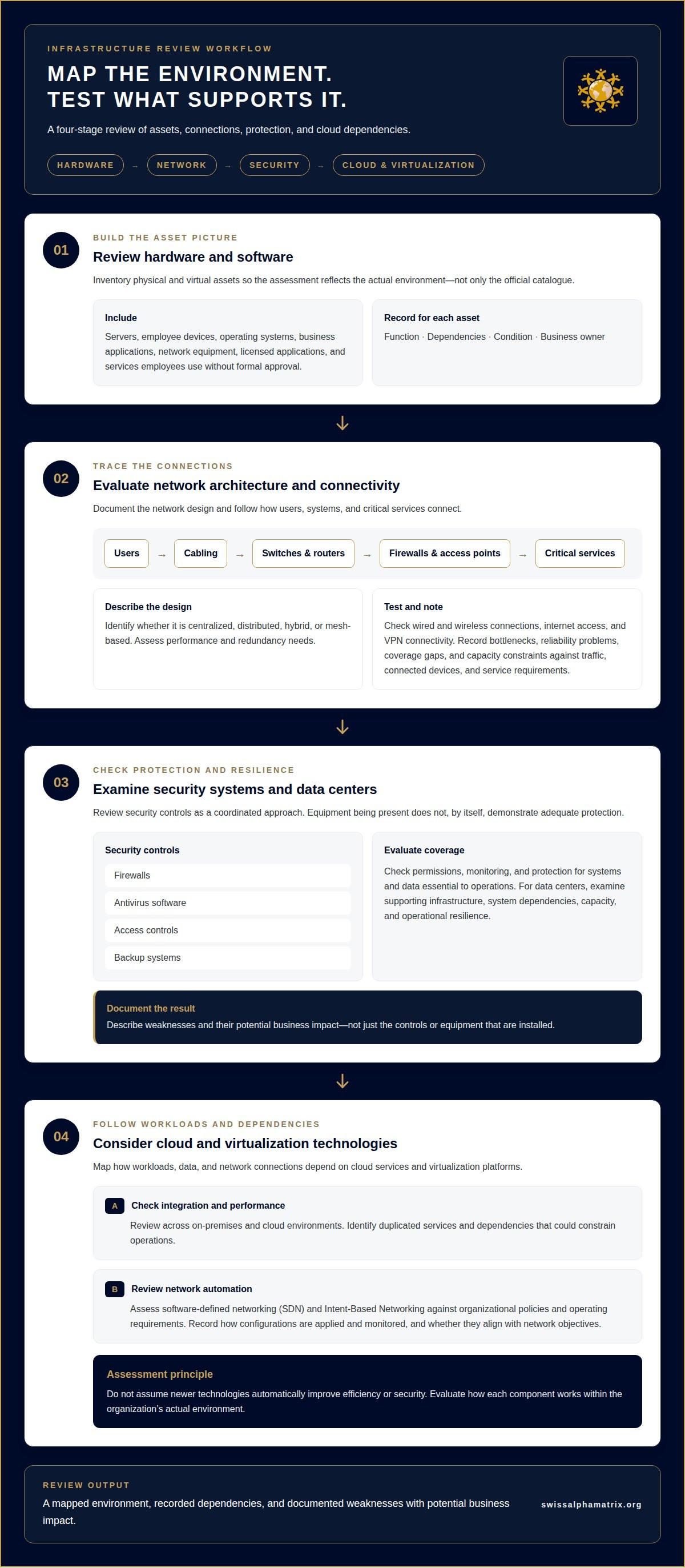
Review hardware and software
Inventory physical and virtual assets, including servers, employee devices, operating systems, business applications, and network equipment. The Centers for Medicare & Medicaid Services (CMS) identifies an inventory of systems, hardware, software, and services as a starting point.
For each asset, record its function, dependencies, condition, and business owner. Include licensed applications and services employees use without formal approval, so the assessment reflects the actual environment, not just the official catalogue.
-
Evaluate network architecture and connectivity
Document whether the network is centralized, distributed, hybrid, or mesh-based, then assess whether its design meets performance and redundancy needs. Trace connections among users, systems, and critical services through cabling, switches, routers, firewalls, and access points.
Test wired and wireless connections, internet access, and VPN connectivity. Record bottlenecks, reliability problems, coverage gaps, and capacity constraints against traffic levels, connected devices, and service requirements.
-
Examine security systems and data centers
Review firewalls, antivirus software, access controls, and backup systems as parts of a coordinated security approach. Check whether permissions, monitoring, and protection cover the systems and data essential to operations.
For data centers, examine supporting infrastructure, system dependencies, capacity, and operational resilience. Document weaknesses and their potential business impact; the presence of equipment alone does not demonstrate adequate protection.
-
Consider cloud and virtualization technologies
Map cloud services and virtualization platforms, including how workloads, data, and network connections depend on them. Evaluate integration and performance across on-premises and cloud environments, identifying duplicated services or dependencies that could constrain operations.
Assess software-defined networking (SDN) and Intent-Based Networking against the organization’s policies and operating requirements. Record how configurations are applied and monitored, and whether they align with network objectives. Do not assume newer technologies automatically improve efficiency or security.
Technology review goals: security, efficiency, and business impact
Set review objectives before measuring systems, so the findings reflect business priorities rather than technology in isolation. Use business goals, user needs, and operational exposure to guide the assessment.
-
Define business and user technology needs
Translate strategic business goals into measurable technology requirements, such as reliable customer service applications or timely financial reporting. For each objective, specify the desired outcome, responsible business function, and measure of success.
Gather user needs through interviews or surveys about application preferences, recurring delays, and work-related obstacles. Compare feedback with business priorities, then identify gaps between what teams need and what existing systems support. Assess each requested feature for operational relevance and measurable value rather than treating every request as essential.
-
Evaluate security and efficiency goals
Assess whether security measures address threats to critical operations and sensitive data. Link vulnerabilities to potential business impacts, then rank remediation priorities by exposure and operational consequences.
Evaluate efficiency using defined measures, including uptime, response time, network latency, throughput, error rates, and resource utilization. Establish a baseline and compare results with service requirements, so gains in one measure do not hide deterioration in another. For example, faster processing has limited value if errors disrupt essential transactions.
-
Assess user experience and operating costs
Measure user experience alongside technical performance. Combine employee feedback with response times, error rates, and application availability to identify friction, such as slow access to a business-critical application.
Review maintenance, upgrades, training, downtime, and resource use when assessing operating costs. Look for low usage or overlapping functions in cloud applications, then consider whether consolidation would preserve necessary capabilities. Distinguish direct expenditure from operational consequences: an inexpensive system may still create substantial costs through interruptions or repeated manual work.
-
Review continuity and recovery planning
Identify critical systems and processes, then map their dependencies to establish recovery priorities. Check whether backup and recovery strategies cover essential data and whether offsite backups support recovery after a physical emergency.
Test the plan through simulations that examine decision-making, responsibilities, and restoration steps. Record where recovery depends on unavailable systems or unclear ownership, then assign corrective actions. For complex operational dependencies, operational due diligence can help evaluate how technology arrangements support continuity objectives.
Disaster recovery planning and incident response drills
Assess IT infrastructure by defining the scope, gathering evidence, evaluating risks, and documenting prioritized actions. Include recovery tests, assigned responsibilities, and resources so the findings can inform operational decisions.
- Set the assessment scope. Identify the critical systems, business processes, locations, and devices the review will cover. Define objectives, stakeholders, timeline, budget, and skilled personnel before work begins. For example, a customer-service system may have a different recovery priority from an internal reporting tool. Record the method used to assess each area.
- Map continuity dependencies. Trace how critical operations rely on applications, networks, staff, suppliers, and data. Identify which dependencies must be restored first to maintain essential services. Document recovery responsibilities and decision authority so teams know who coordinates each action during an incident.
- Test backup and response procedures. Simulate a cyber incident or physical disruption, then exercise incident communications and recovery steps. Check whether teams can locate backup data, restore critical services, and escalate unresolved issues. Record failures, delays, and unclear instructions; a written plan alone does not show that recovery procedures work in practice.
- Prioritize vulnerabilities and upgrades. Assess identified weaknesses by severity and potential impact on operations, then assign owners and remediation timelines. Connect upgrades to specific risks or capacity needs rather than replacing technology without a defined purpose. A 3-year technology refresh plan can help organize modernization, compatibility, and security priorities.
- Turn findings into an implementation plan. Specify tasks, accountable roles, resources, and milestones for each improvement. Sequence changes to protect availability, especially when a critical system depends on the technology being upgraded. Track progress against agreed objectives, then retest affected recovery procedures to confirm the revised environment supports continuity.
Cybersecurity posture and vulnerability assessment
- Map exposure to critical assets. Link customer data, financial records, business applications, and operational systems to their supporting accounts, devices, and network connections. This asset-to-exposure map shows how a compromised endpoint could affect sensitive information or interrupt essential operations. Include cloud applications used for work, since unapproved services can reduce oversight of company data.
- Test vulnerabilities using complementary methods. Combine vulnerability scanning, penetration testing, and performance monitoring to find weaknesses from different perspectives. A scan may flag outdated software, while a controlled penetration test examines whether weaknesses can be exploited across connected systems. Record affected assets, supporting evidence, and operational consequences instead of treating every technical alert as equally urgent.
- Examine access and network boundaries. Review administrative permissions, inactive accounts, and access rights against current job responsibilities. Check whether network segmentation separates critical, guest, and production environments; weak separation can expose sensitive systems to activity elsewhere. Assess encryption, firewalls, and user permissions as coordinated measures, not isolated controls.
- Assess people, devices, and software practices. Check whether business-critical applications receive updates and patches, and whether employees receive guidance on phishing and data protection. Review access to sensitive information over unsecured networks, including public Wi-Fi. Include personal devices and shadow IT, which can create vulnerabilities outside formal security oversight.
- Prioritize remediation against objectives. Rank findings by severity, likelihood of operational impact, and sensitivity of affected data. Assign owners, timelines, and budget priorities, then retest corrected weaknesses to determine whether exposure has changed. For compliance, map relevant obligations to specific data, systems, controls, and evidence; requirements depend on the organization’s jurisdictions and activities.
For structured coordination of complex cybersecurity remediation, discuss your assessment priorities.
Swiss Alpha Matrix
Swiss Alpha Matrix helps translate infrastructure assessment findings into structured due diligence and clear next steps. When technology weaknesses affect a complex financial or investment programme, its Operational Due Diligence and Complex Project Management support a disciplined review of operational dependencies, responsibilities, and remediation priorities.
When decisions depend on financial instruments or conditions requiring direct assessment, Audit-Grade Instrument Validation and On-Ground Verification Services can help stakeholders examine broader operational and transactional exposure. These services complement an internal technical review; they do not replace hands-on IT administration or cybersecurity operations.
Contact Swiss Alpha Matrix to discuss how its due diligence and project management capabilities may fit your assessment.
Make the next technology decision with confidence
The lasting value of learning how to assess a company’s IT infrastructure lies in the decisions that follow: evidence-based judgment, clear accountability, and a deliberate sequence of action. Treat each finding as an input to governance, not merely a technical issue to close. This helps leadership distinguish immediate exposure from investment decisions that call for broader operational or transactional scrutiny.
Swiss Alpha Matrix supports complex evaluations through Audit-Grade Instrument Validation, On-Ground Verification Services, and Complex Project Management. These capabilities are relevant when infrastructure concerns intersect with broader programmes, verification needs, or coordinated implementation. The next step is to define the decision at hand and the evidence needed to move it forward.
Contact Swiss Alpha Matrix to discuss your assessment priorities and determine a considered path forward.
Frequently Asked Questions
How long does the assessment process take?
There is no fixed duration for an IT infrastructure assessment. The timeline depends on scope, system complexity, evidence availability, and stakeholder access. A review of a defined environment differs from one that covers multiple sites, cloud services, and recovery exercises. Allow time to gather records, interview relevant teams, analyze findings, and agree on priorities; the work is not complete when data collection ends.
What is an information technology risk assessment?
An information technology risk assessment identifies digital assets, threats, vulnerabilities, and potential impacts, then determines how to reduce exposure. For example, trace how an employee account connects to a finance application and consider the consequences if that account were compromised. Record each risk with its affected asset, business consequence, mitigation, and accountable owner so leadership can track decisions.
What is included in an IT assessment?
An IT assessment can cover infrastructure, security, operational efficiency, data management, compliance, strategic alignment, user experience, cloud systems, and emerging technologies. Set the scope around the decision being made: a modernization review may emphasize capacity and dependencies, while a governance review may focus on controls and records. A useful report explains its methodology, findings, risks, and recommended actions.
What is an IT infrastructure assessment and what does it cover?
An IT infrastructure assessment examines the technology foundation behind an organization’s operations and how its components perform together. It reviews asset condition, network design, system security, operational dependencies, and capacity for future demand. Make these relationships visible: a change to a shared identity service, for example, could affect access across several applications, not just one system.
What IT infrastructure components should be inventoried and evaluated?
Include servers, employee devices, operating systems, business applications, network equipment, cloud services, telephony, and backup platforms. For each item, capture its business purpose, owner, dependencies, location, and access arrangements. Include employee-used tools outside formal approval, since an incomplete inventory can leave data flows and support responsibilities overlooked. Assess condition and compatibility alongside operational importance.
How do you assess network performance, capacity, and reliability?
Measure bandwidth, latency, packet loss, and jitter across representative connections, then compare results with the needs of critical services and users. Review traffic patterns to locate congestion and identify which applications or devices consume capacity. Check reliability across wired and wireless access, internet links, and VPN connections; recurring interruptions or uneven performance can reveal bottlenecks that average measurements conceal.